
Building apps used to require months of coding, expensive developers, and complex API integrations.
With the rise of vibe coding, things are changing fast.
In this post, you're going to learn about Google's newAI Studio app builderlets you create functional AI applications in minutes, completely free.
I've been testing this platform alongside their new Nano Banana image generation model, and the results might surprise you.
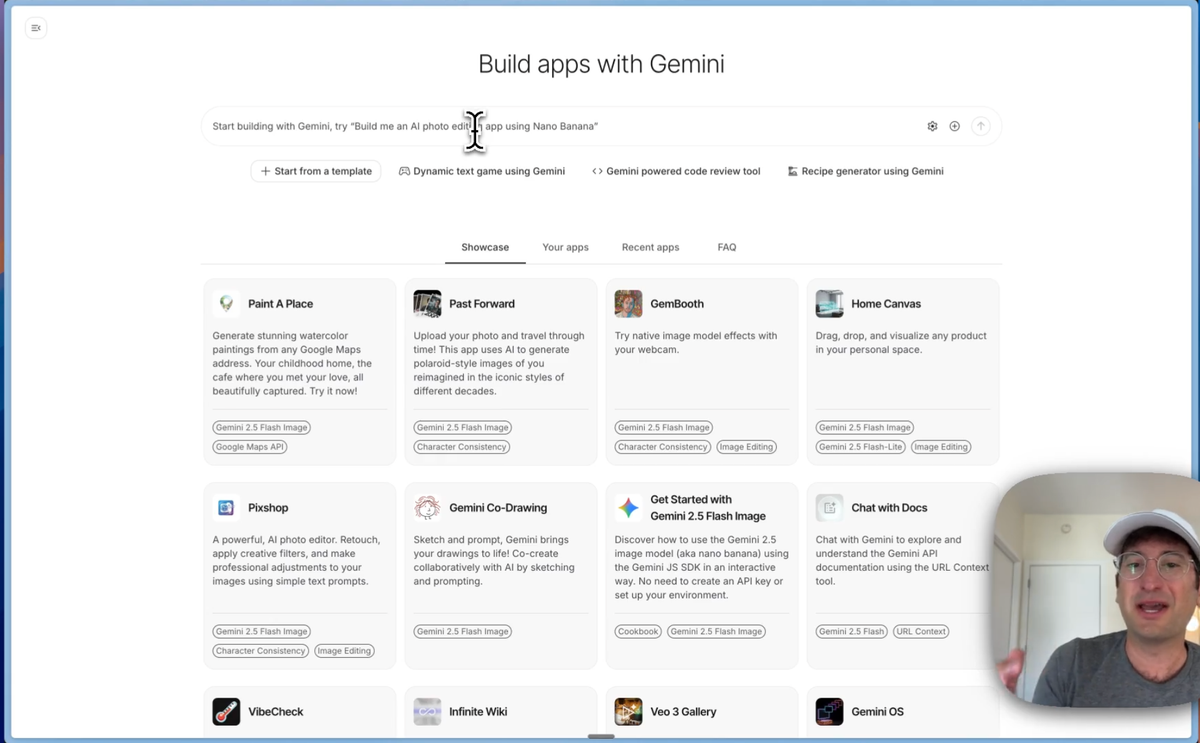
Introduction to Google AI Studio Build Apps with Gemini Feature
Google's new AI app builder is making waves in the development community. This isn't just another coding assistant - it's a complete app building environment that rivals established players like Lovable and Bolt.
Here's what makes it special:
- Built-in AI functionality - No API connections required
- GitHub sync capabilities for seamless development workflow
- Completely free to test and build apps
- Real-time preview and debugging features
The platform uses Gemini 2.5 Pro coding capabilities to generate clean, functional code.
What's interesting is how Google AI APIs vs OpenAI positioning is shifting. Many developers still default to OpenAI or Anthropic, but Google's APIs are seriously underrated. They're powerful, reliable, and now more accessible than ever.
The interface mirrors what you'd expect from modern AI-powered marketing asset creation tools. You get a chat interface on the left, file management in the center, and a live preview on the right. It's intuitive enough that even non-developers can start building immediately.
Hands-On Testing: Building an AI Image Editor with Nano Banana Model
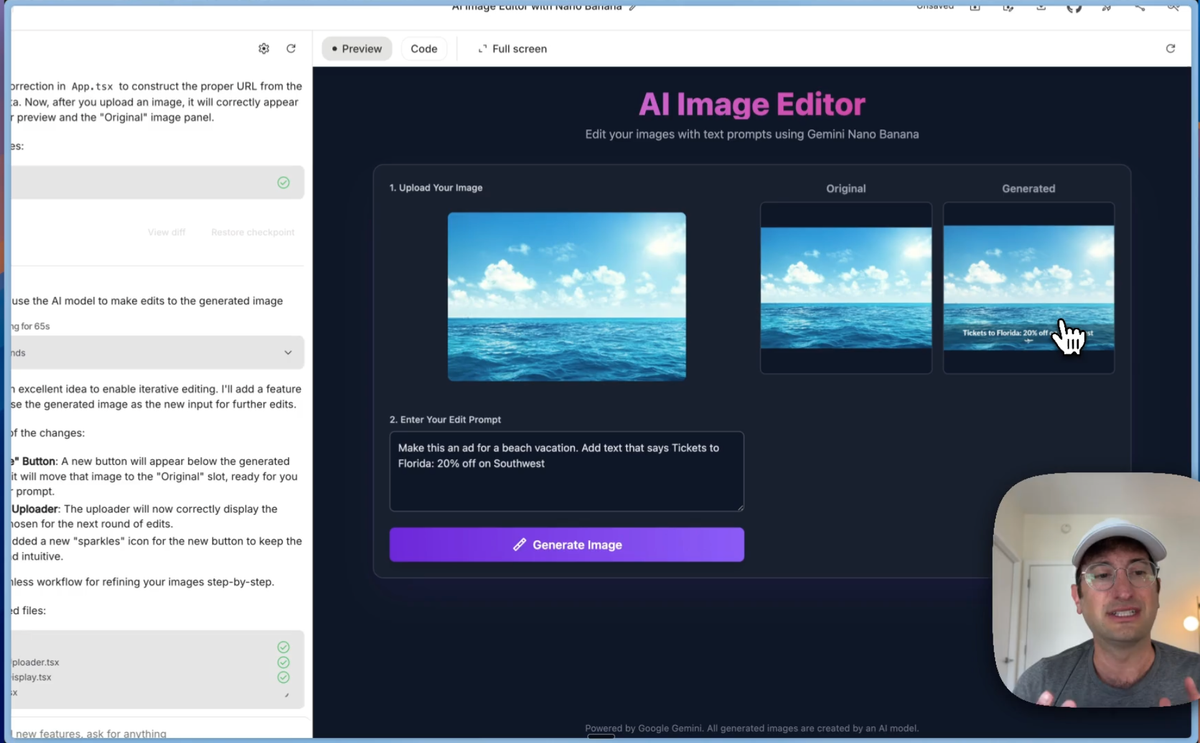
I decided to try it out by creating an image editor that uses Google's new Nano Banana model. The process was surprisingly straightforward.
The platform created a complete AI image editor with text prompts interface in under five minutes. Here's what happened:
- Chat interface for user prompts
- File upload section for original images
- Live code preview with syntax highlighting
- Functional app preview that works immediately
When errors popped up (and they did), the auto-fix feature kicked in. This kind of intelligent debugging makes the platform accessible to people who might be intimidated by traditional development.
The generated app included:
- Clean, modern UI design
- Proper error handling
- Responsive layout
- Integration with Google's AI APIs
What struck me most was how polished the output looked. This wasn't just a proof of concept - it was a deployable application that could handle real users.
Nano Banana Image Generation Model Performance and Capabilities
The Nano Banana image generation model is where things get interesting. I tested it with a simple ocean scene, asking it to add dolphins jumping out of the water. The results were impressive.
Here's what the model excels at:
- Text overlay accuracy - Adding readable text without spelling errors
- Object insertion - Seamlessly adding elements like animals, buildings, or people
- Style consistency - Maintaining the original image's aesthetic
- Iterative editing - Building on previous edits without starting over
I tested marketing asset creation potential by asking it to transform my ocean scene into a Florida vacation ad with "Tickets to Florida 20% off on Southwest" text. The model correctly added the text without spelling mistakes - something that would have been impossible just a year ago.
The iterative workflow is particularly powerful. You can:
- Upload your original image
- Make an edit (add dolphins)
- Use that result as the new base
- Make another edit (add a whale)
- Continue building on previous edits
This creates an image-to-image editing workflow that's more sophisticated than most consumer tools. The fact that it handles text accurately puts it in serious competition with established solutions.
Advanced Features and Use Cases for AI App Development
Beyond basic image editing, this platform opens doors for serious business applications. I can see immediate use cases for:
Lead Generation Tools
Build a specialized image editor for your niche market. Real estate agents could create property showcase tools. Restaurants could build menu design apps. The possibilities are endless when you can deploy functional apps in minutes.
Social Media Asset Generators
The platform excels at creating social media asset generators with built-in AI capabilities. Users upload their base content, and your app transforms it into platform-specific formats with appropriate text overlays.
System Prompt Optimization
The real power comes from fine-tuning your prompts. Instead of generic "add text" commands, you can create specialized prompts for specific industries:
- "Create a professional LinkedIn post image with corporate styling"
- "Generate an Instagram story with trendy fonts and colors"
- "Design a Facebook ad with conversion-focused copy placement"
This level of system prompt optimization for business applications turns a simple image editor into a specialized marketing tool.
Pros, Cons, and Future Potential of Google AI Studio Build Apps
After extensive testing, here's my honest assessment:
The Good
- Zero cost to start - No subscription fees or usage limits for testing
- Professional output quality - Generated apps look and function like production software
- GitHub integration - Easy transition to traditional development workflows
- Built-in AI functionality - No need to manage separate API keys or connections
- Auto-debugging - Intelligent error detection and fixing
The Challenges
- Limited customization compared to hand-coded solutions
- Dependency on Google's infrastructure for AI features
- Learning curve for effective prompt engineering
- Beta-stage limitations - Some features still need refinement
Business Applications
The monetization opportunities are significant. You could:
- Build specialized tools for specific industries
- Create white-label solutions for agencies
- Develop subscription-based asset generation tools
- Offer custom app development services using the platform
The integration possibilities with existing development workflows make this particularly attractive for agencies and freelancers who want to offer AI-powered solutions without the complexity of managing multiple APIs.
Want an alternative AI app builder? Check out our six favorites here:
Getting Started: Your Next Steps with Google AI Studio
Ready to start building? Here's your roadmap:
Step 1: Access the Platform
Visit ai.dev and sign up for free. No credit card required, no usage limits for basic features.
Step 2: Start Simple
Begin with a basic app concept. Image editors, text processors, or simple calculators work well for learning the interface.
Step 3: Master Prompt Engineering
The quality of your output depends heavily on your prompts. Be specific about:
- Desired functionality
- UI/UX preferences
- Target audience
- Integration requirements
Step 4: Test and Iterate
Use the auto-fix feature when errors occur. The AI learns from corrections and improves subsequent generations.
Step 5: Deploy and Scale
Sync successful projects to GitHub for further development or deploy directly using the platform's hosting options.
The Nano Banana model's potential extends far beyond simple image editing. As Google continues refining the technology, we can expect more sophisticated capabilities and better integration options.
Want to level up your no-code skills even further? We teach the latest AI-powered development techniques and traditional no-code platforms in our comprehensive courses. Sign up for No Code MBA to master the tools that are shaping the future of app development.
Frequently Asked Questions
Is Google AI Studio Build Apps with Gemini really free to use?
Yes, the platform is completely free for testing and basic usage. You don't need a credit card to get started, and there are no hidden fees for core functionality. Google may introduce paid tiers for advanced features or higher usage limits in the future.
How does the Nano Banana model compare to other image generation tools?
Nano Banana excels particularly at text accuracy and iterative editing. While it may not match the artistic sophistication of some competitors, its ability to add readable text and maintain consistency across edits makes it valuable for business applications and marketing asset creation.
Can I use the apps I build commercially?
Yes, you can deploy and monetize apps built with Google AI Studio. The platform includes GitHub sync capabilities, so you can take your generated code and continue development in other environments. Always check Google's current terms of service for the most up-to-date commercial usage policies.
Do I need coding experience to use Google AI Studio Build Apps?
No coding experience is required to start building apps. The platform uses natural language prompts to generate code automatically. However, some basic understanding of app functionality and user experience design will help you create more effective prompts and better apps.
How does this compare to other AI app builders like Lovable or Bolt?
Google AI Studio's main advantage is the built-in AI functionality without requiring separate API connections. It's also completely free, while some competitors have usage limits or subscription requirements. The trade-off is that you're working within Google's ecosystem, which may limit some customization options compared to more flexible platforms.
Advertiser disclosure: some links on this website are affiliate links, meaning No Code MBA may make a commission if you click through and purchase.