
Looking to build an app but don't know where to start?
⚡ Looking for the full picture? Read our complete Lovable review for hands-on testing, pricing breakdown, and honest pros/cons.
AI app builders are revolutionizing the way we create software, making it easier than ever for non-technical users to bring their ideas to life.
In this comprehensive comparison, we'll pit two popular AI-powered app creation tools against each other: Tempo vs Lovable. By the end of this article, you'll have a clear understanding of which platform might be the best fit for your next project.
AI App Builders Comparison: Tempo vs Lovable
Both Tempo and Lovable offer unique approaches to AI-powered app creation. Let's break down their key differences:
Initial Prompt and App Concept
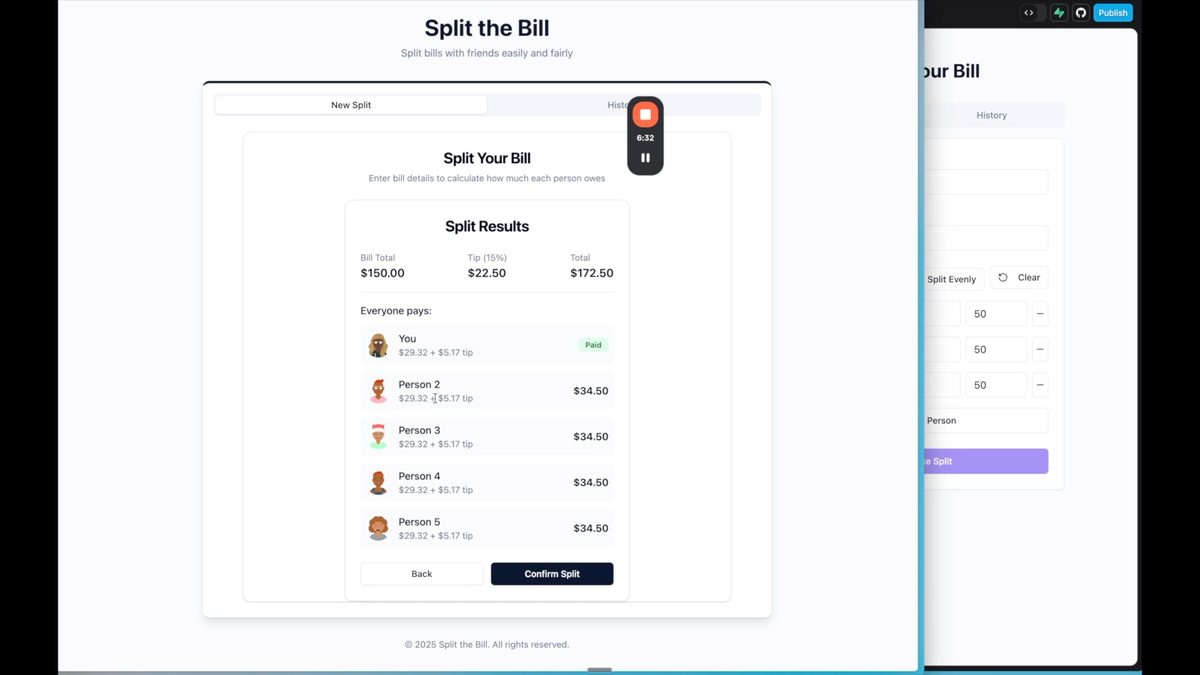
For this comparison, we used the same prompt for both platforms: "I want to build a bill splitting app to make it easier to split bills with my friends." This simple concept allowed us to test how each AI tool interprets and implements user requirements.
Tempo's Approach
- Generates a comprehensive Product Requirements Document (PRD)
- Creates a mermaid diagram to visualize user flow
- Develops initial wireframes
- Focuses on preparation and planning before coding
Lovable's Approach
- Immediately starts coding and designing
- Provides design inspiration and feature suggestions
- Offers a more rapid prototyping experience
Building a Bill Splitting App with AI-Powered App Creation Tools
Let's dive into how each platform handled the development of our bill splitting app.
Basic Functionality Implementation
Both Tempo and Lovable successfully implemented the core features of a bill splitting app:
- Even split calculation
- Tip calculation
- User interface for inputting bill details
Custom Split Functionality
This is where the platforms began to diverge:
Tempo
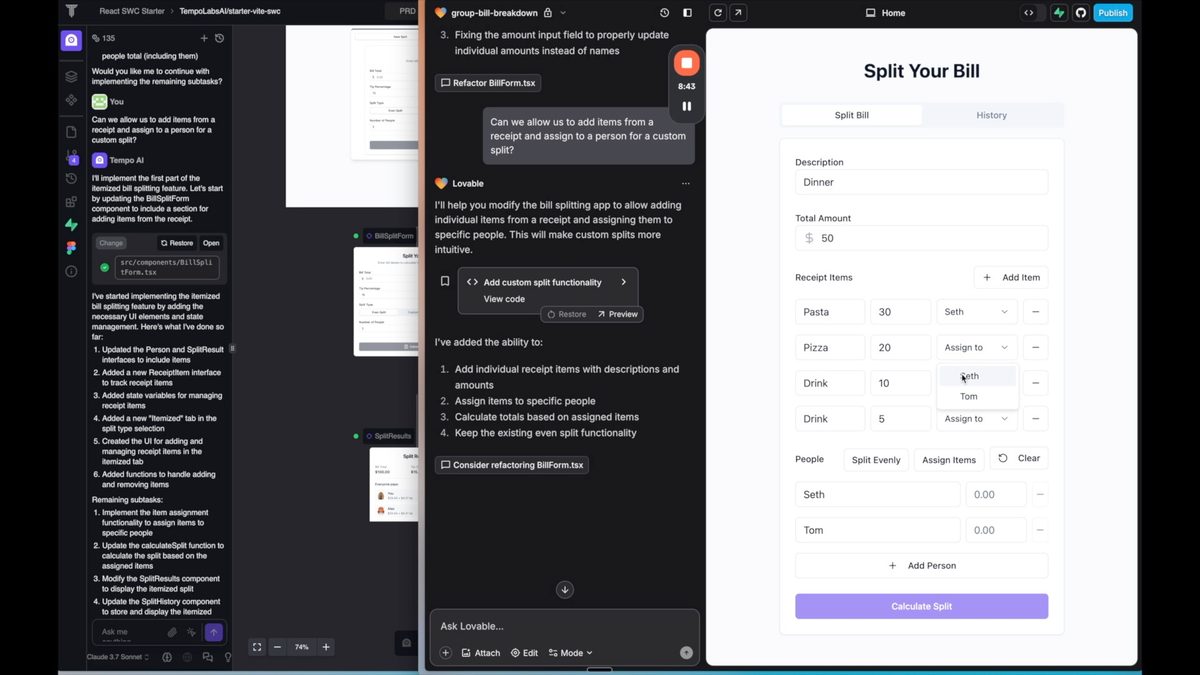
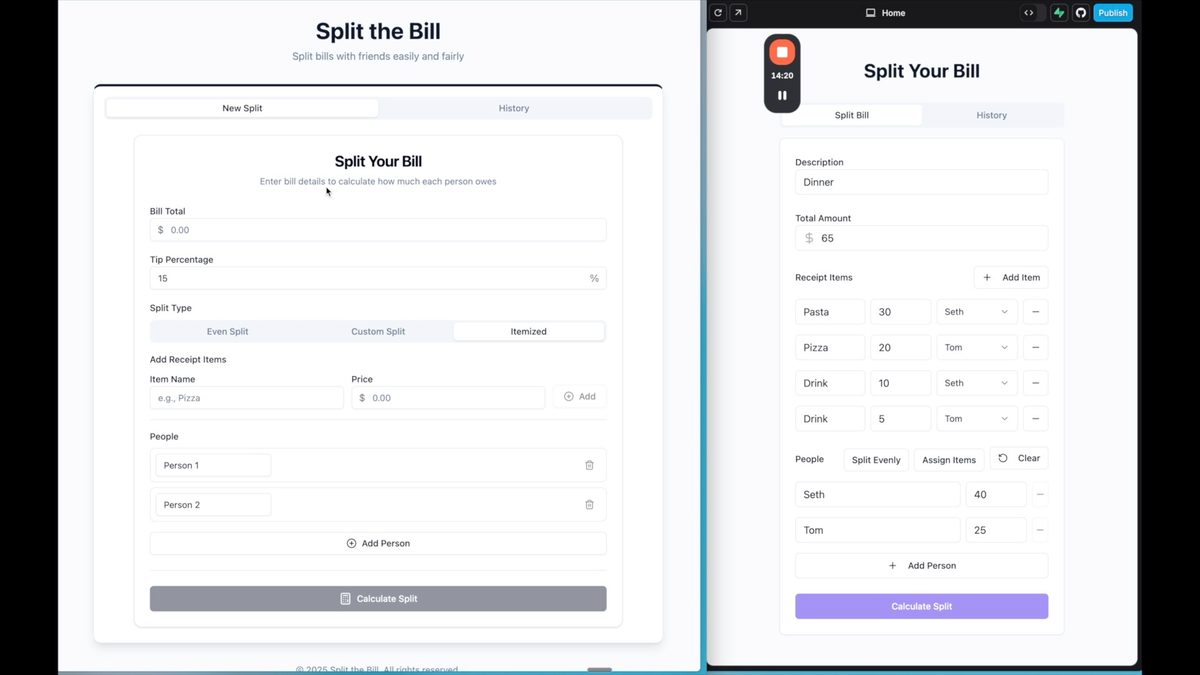
Initially struggled with custom split implementation, requiring additional prompts to improve functionality. The final version allowed users to add items and assign them to specific people, but the UI was somewhat complex.
Lovable
Implemented a simpler, more intuitive custom split feature. Users could easily add items, assign them to individuals, and calculate the split with a cleaner interface.
User Interface Design Comparison
Tempo's Design Strengths
- More comprehensive initial design
- Included additional features like avatars for users
- Better history design and overall aesthetic
Lovable's Design Approach
- Simpler, more elegant solutions
- Intuitive dropdown menus for assigning items
- Clean, easy-to-understand interface
Rapid Prototyping Tools: Strengths and Weaknesses
Both Tempo and Lovable have their unique advantages when it comes to rapid prototyping. Let's break down their strengths:
Tempo's Advantages
- Comprehensive initial design and planning
- Automatic PRD generation
- Feature ideation and suggestions
- Better suited for more complex, fully-functional applications
Lovable's Advantages
- Quick implementation of core features
- Simple and elegant solutions
- Ease of use for non-technical users
- Ideal for rapid prototyping and simple internal tools
Choosing the Right AI App Builder for Your Project
When deciding between Tempo and Lovable, consider the following factors:
Project Complexity
If you're building a more complex application with multiple features and need comprehensive planning, Tempo might be the better choice. Its PRD generation and feature ideation can help guide your development process.
However, with Lovable, you can create a PRD using AI and use this as your initial prompt.
Development Speed
For quick prototypes or simple internal tools, Lovable's rapid implementation and intuitive design make it an excellent choice. You can get a working version of your app faster with Lovable.
However, Tempo creates an app quickly too - it just takes a few minutes longer to complete.
Technical Expertise
If you lack technical knowledge or struggle to articulate your app requirements, Tempo's guided approach and automatic PRD generation can be invaluable. Lovable, while simpler to use, may require more specific instructions to achieve desired results.
User Interface Preferences
Both platforms produce functional designs, but Tempo tends to create more comprehensive initial designs. Lovable, on the other hand, excels at simple, elegant interfaces. Choose based on your aesthetic preferences and user experience goals.
Remember, the AI app building landscape is constantly evolving. It's essential to continually test and evaluate these tools to see which one best fits your current project needs.
Want to learn more about Lovable? Watch this:
Want to dive deeper into the world of no-code app development? Sign up for No Code MBA and access our comprehensive courses on various no-code tools and platforms. Whether you're a beginner or an experienced developer, we have resources to help you build better apps faster.
Frequently Asked Questions
What is an AI app builder?
An AI app builder is a tool that uses artificial intelligence to help users create applications with minimal coding knowledge. These platforms interpret user prompts and requirements to generate code, design interfaces, and implement features automatically.
Can I use AI app builders for complex projects?
While AI app builders are continuously improving, they may still have limitations for very complex projects. However, tools like Tempo show promise in handling more sophisticated applications, especially with their comprehensive planning and PRD generation features.
Do I need coding experience to use Tempo or Lovable?
No, both Tempo and Lovable are designed to be used by people with little to no coding experience. However, having some technical knowledge can help you better articulate your requirements and understand the generated code.
How accurate are the AI-generated designs and features?
The accuracy of AI-generated designs and features can vary. While both Tempo and Lovable produced functional apps in our comparison, they sometimes required additional prompts or adjustments to achieve the desired results. It's important to review and refine the AI-generated output.
Which AI app builder is better for beginners?
For absolute beginners, Lovable might be easier to start with due to its simpler interface and rapid prototyping capabilities. However, Tempo's guided approach and comprehensive planning could be beneficial for beginners who need more structure in their app development process. If you're new to app development, you might also want to check out our guide on the best no code app builders for beginners.
Advertiser disclosure: some links on this website are affiliate links, meaning No Code MBA may make a commission if you click through and purchase.