(This post is sponsored by Manus. Try Manus here)
Business owners spend countless hours on repetitive tasks that could be automated.
What if you had a virtual co-founder that could build web applications, conduct market research, and generate leads while you focus on strategy? I recently put Manus's AI agents to the test - treating them like my actual co-workers to tackle real items on my to-do list.
The results surprised me. Instead of just theoretical demos, I watched Manus complete actual business tasks that I'd been procrastinating on for months. Let's find out what this tool can do.
Testing Manus AI Agent Automation Tools for Real Business Tasks
Rather than creating fake scenarios, I decided to treat Manus like a genuine co-founder. My approach was simple: give it four real challenges that were sitting on my No Code MBA to-do list and see what happened.
The beauty of Manus lies in its multi-agent capabilities. You can spin up multiple tasks simultaneously and watch them work in parallel. This isn't just convenient—it's how you'd actually want to work with a virtual assistant.
Here's what I assigned to my AI workforce:
- Build a custom CRM for tracking YouTube sponsorships
- Research trending AI tool videos for content strategy
- Find potential newsletter advertisers in the AI space
- Analyze my website homepage for conversion improvements
The multi-tracking workflow felt natural. Start one task, move to another, then circle back when notifications arrived. It's exactly how you'd manage multiple human contractors.
Building a Custom CRM with AI Web App Builder Capabilities
My sponsorship tracking was a mess. Everything lived in a basic Google spreadsheet that worked but wasn't scalable. I asked Manus to build a proper CRM web app for managing YouTube sponsorship requests with fields for sponsor info, payment details, and video publication status.
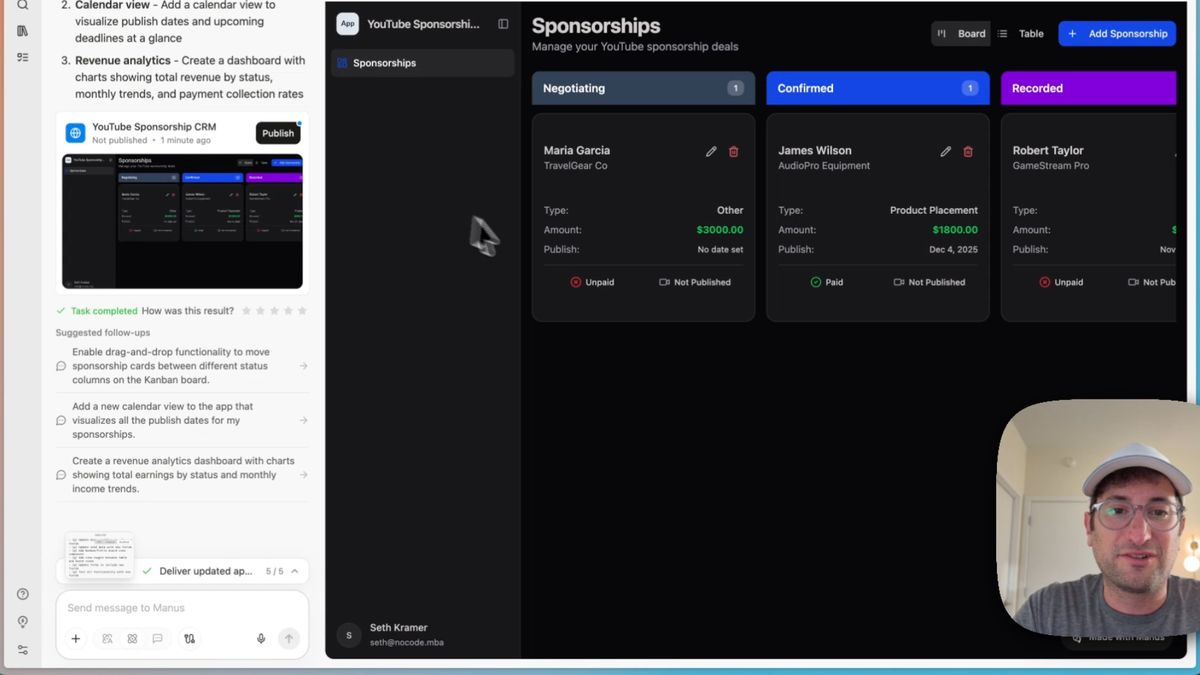
The AI web app builder capabilities impressed me immediately. Manus didn't just create a simple form; it built a complete full-stack application with a database backend. The interface featured a dark theme dashboard where I could add, edit, and delete sponsorships while tracking payment and publication status.
But here's where it got interesting. The initial version was functional but basic. When I requested 10 dummy data rows to test with more realistic content, Manus populated the database seamlessly. Then I asked for publish dates, status tracking, and a Trello-style board view.
The transformation was remarkable:
- Seven status stages: negotiating, confirmed, recorded, editing, scheduled, published, completed
- Kanban board interface with drag-and-drop functionality
- Table view alternative for different workflow preferences
- Clean, professional design that I'd actually want to use
Testing the drag-and-drop feature worked flawlessly. Cards moved between columns smoothly, and the status updates were instant. This wasn't a prototype—it was production-ready software.
Automated Research Agents for Content Strategy and Lead Generation
Research tasks are where AI agents really shine. I set up two concurrent research projects to test Manus's capabilities with real-world business intelligence needs.
YouTube Analytics Automation for Content Ideas
Finding trending topics manually takes hours of scrolling and analysis. I asked Manus to research YouTube videos from the last month in the AI tool space that outperformed based on views relative to channel size.
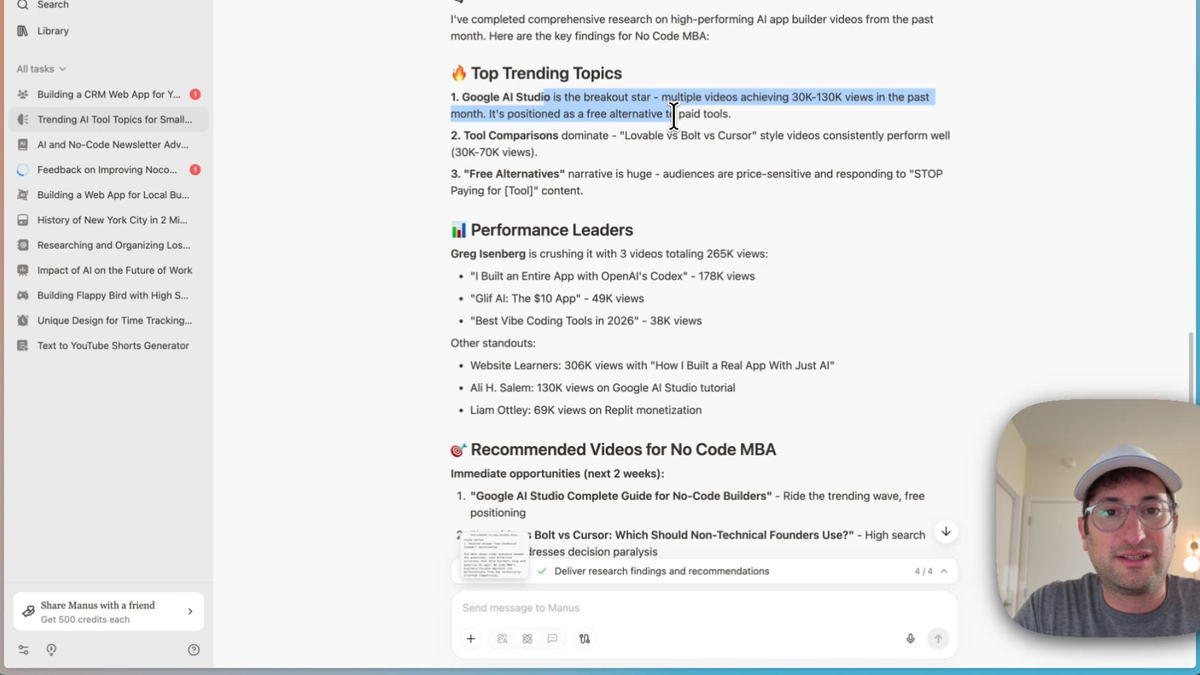
The agent browsed YouTube directly, analyzing performance metrics across multiple channels. It identified several key trends:
- Google AI Studio emerged as a breakout topic with multiple 300K+ view videos
- Tool comparison content consistently performed well
- Free alternative guides attracted significant engagement
- Specific recommendations like "Lovable vs Bolt vs Cursor" comparisons
What made this valuable was the executive summary report. Rather than just listing popular videos, Manus provided strategic insights about why certain topics resonated and specific content opportunities for my channel.
Newsletter Advertiser Research for Lead Generation
Finding potential newsletter advertisers typically requires manual research across dozens of publications. I tasked Manus with identifying 20 companies that advertised in AI and no-code newsletters within the last month.
The research quality exceeded expectations. Manus analyzed major newsletters like TLDR AI, Ben's Bites, The Neuron, and Superhuman, extracting real advertiser data with contact information and recent campaign details.
The deliverable was a comprehensive spreadsheet including:
- Company names and descriptions
- Newsletter sources and URLs
- Actual ad copy examples
- Contact information where available
- Recency indicators for prioritization
I spot-checked several entries by visiting the newsletter archives directly. The accuracy was impressive—Manus had correctly identified sponsors like 11 Labs and IBM from recent Ben's Bites issues.
Advanced AI Agent Productivity Workflows with Scheduled Tasks
The real power emerged when I started thinking about recurring automation. Why run these research tasks once when you could schedule them to run automatically?
For the newsletter advertiser research, I asked Manus to create a daily scheduled task. The system would check major AI newsletters every morning at 11 AM, identify new advertisers, update the spreadsheet, and send me a summary of fresh leads.
Scheduled AI tasks transform one-time research into ongoing business intelligence. The setup was straightforward through Manus's task scheduler interface, and I could modify timing or frequency as needed.
I applied the same logic to YouTube trend research, setting up a weekly automation to monitor emerging topics and high-performing content. These AI agent productivity workflows essentially created a personal research team that never sleeps.
The competitive analysis task also became a monthly scheduled automation. Having Manus regularly research competitors like Build Camp and No Code Institute provides ongoing market intelligence without manual effort.
Manus AI vs Other No-Code CRM Development Tools: Honest Assessment
After several hours of real-world testing, here's my unfiltered take on where Manus excels and where it falls short.
What Works Exceptionally Well
The research capabilities are genuinely impressive. Manus browses the web like a human analyst, clicking through pages, extracting relevant information, and synthesizing insights. The quality of research output rivals what I'd expect from a skilled virtual assistant.
The multi-agent workflow is a game-changer. Being able to run multiple tasks simultaneously makes the tool feel like managing a small team rather than using a single AI assistant.
No-code CRM development exceeded my expectations. The CRM Manus built wasn't just functional—it had thoughtful UX design, proper database architecture, and features I hadn't even requested.
Limitations and Areas for Improvement
The web app builder, while impressive, has some constraints. Complex business logic or advanced integrations might require traditional development tools. Think of it as excellent for MVPs and internal tools, but potentially limiting for customer-facing applications.
Research accuracy, while good, isn't perfect. I found a few instances where contact information was incomplete or newsletters were misattributed. Always verify critical data before acting on it.
The scheduled task system works well but lacks some advanced features like conditional logic or integration triggers that you'd find in dedicated automation platforms like Zapier.
ROI Analysis for Business Owners
The time savings are substantial. Tasks that would typically take 3-4 hours of manual work were completed in 30-45 minutes. For business owners billing their time at $100+ per hour, the tool pays for itself quickly.
However, you still need to provide clear direction and review outputs. This isn't a "set it and forget it" solution—it's more like managing a very capable remote team member.
Getting Started with AI-Powered Business Automation
Based on my testing experience, here's how to maximize success with AI-powered business automation tools like Manus.
Start with Clear, Specific Prompts
Vague requests produce mediocre results. Instead of "research competitors," try "research AI and no-code newsletters and give me 20 advertisers who have advertised in those newsletters in the last month."
Include context about your business, target audience, and intended use for the output. The more specific you are, the better the results.
Think in Terms of Recurring Value
One-time tasks are useful, but scheduled automations provide ongoing value. Consider which business processes you repeat weekly or monthly and set up automated agents to handle them.
Start Small and Scale Gradually
Begin with low-risk tasks to understand the tool's capabilities and limitations. As you build confidence, gradually assign more important business processes to your AI agents.
Essential Integration Considerations
While Manus handles many tasks independently, consider how outputs integrate with your existing workflow. Can research data easily import into your CRM? Do scheduled reports arrive in formats you can actually use?
For more complex automation needs, you might combine Manus with other no-code automation tools to create comprehensive business workflows.
The future of business automation lies in treating AI agents as genuine team members rather than simple tools. When done right, they handle routine tasks while you focus on strategy and growth.
Explore More Manus AI Guides
- 📝 Manus AI Review 2026: Full Platform Breakdown
- 💰 Manus AI Pricing Guide: Plans & Credits Explained
- 🛠️ How to Build an App with Manus AI
- 🏆 Best AI App Builders in 2026
- 🤖 Lindy AI Review: Another Top AI Agent Platform
- ⚡ 16 Zapier Automation Ideas for Your Business
Ready to explore more about building applications with AI? Sign up for No Code MBA to learn how to create powerful business tools using no-code platforms and AI automation.
Frequently Asked Questions
Can Manus build complex web applications or just simple tools?
Manus works best for internal business tools, CRMs, and MVP applications. It can create full-stack web apps with databases, user interfaces, and basic business logic. However, for complex customer-facing applications with advanced features or integrations, you'll likely need traditional development tools or platforms like Bubble for more sophisticated functionality.
How much time can AI agent automation actually save for small businesses?
In my testing, tasks that normally take 3-4 hours were completed in 30-45 minutes. For recurring research, lead generation, and simple app development, you can expect 70-80% time savings. However, you'll still need time for setup, prompt refinement, and output review. The biggest savings come from scheduled automations that run without ongoing supervision.
What's the difference between Manus and other AI automation tools?
Manus's main advantage is combining web app building with research capabilities in a single platform. Most AI tools focus on either automation (like Zapier) or app building (like various no-code platforms), but rarely both. The multi-agent workflow also sets it apart—you can run multiple tasks simultaneously rather than queuing them sequentially.
Is Manus suitable for agencies managing multiple client projects?
Yes, the multi-agent capabilities make it particularly useful for agencies. You can run research for multiple clients simultaneously, build internal tools for project management, and set up recurring automations for client reporting. The scheduled task system works well for delivering regular insights to multiple clients without manual effort.
How much does Manus AI cost?
Manus AI offers a free tier with limited credits plus paid plans starting at $39/month. Credits are consumed per task, with complex tasks like web app building using more credits than simple research queries. See our full Manus AI pricing breakdown for details.
Can Manus AI agents run tasks automatically on a schedule?
Yes, Manus supports scheduled tasks. You can set up daily, weekly, or monthly automations for recurring work like research monitoring, lead generation, and competitive analysis without manual intervention.
Is Manus AI better than Zapier for business automation?
They serve different purposes. Manus excels at open-ended tasks like research, content creation, and building internal tools. Zapier is better for structured app-to-app integrations and trigger-based workflows. Many businesses benefit from using both.
Advertiser disclosure: some links on this website are affiliate links, meaning No Code MBA may make a commission if you click through and purchase.