
Are you looking for a powerful AI app builder that can turn your ideas into reality? Base44, recently acquired by Wix for $80 million, is quickly becoming one of the most popular choices for creating AI-powered applications.
In this comprehensive guide, we'll explore how to use Base44 to build a goal tracking app from scratch, covering everything from initial setup to advanced features and publishing.

📘 Want the full picture on Base44?
Get our complete breakdown of features, pricing, pros and cons in our Base44 Review 2026.
Getting Started with Base44 AI App Builder
Base44 stands out from other AI app builders thanks to its user-friendly interface and integrated features. It's an all-in-one platform that includes everything you need.
This is a big positive if you want a platform that has everything. Note that you might want more control over certain features and integrations. Something to be aware of.
Let's walk through the process of creating your first app:
Step 1: Choose Your App Category
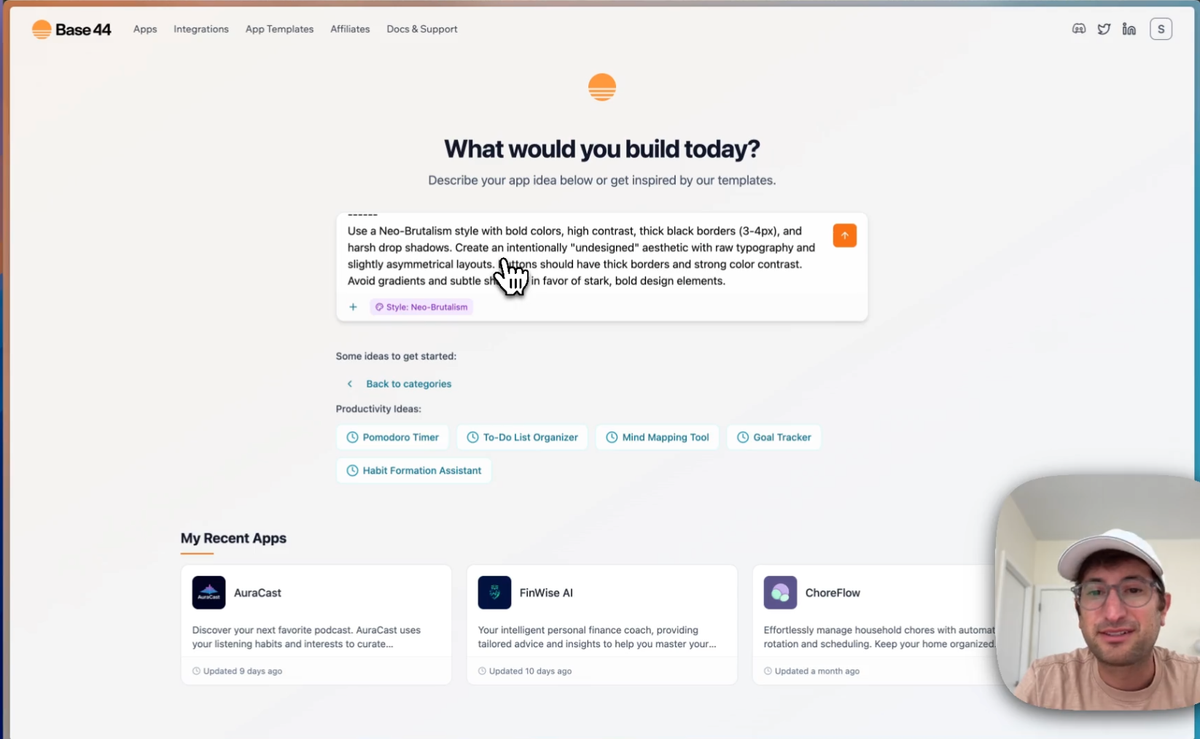
Base44 offers pre-written prompts for various app categories.
For our example, we'll create a productivity app focused on goal tracking and use their prompt.
Step 2: Customize Your Prompt
Next, we can add styling instructions to your prompt for a unique look. Base44 provides options like "Neo brutalism" to help shape your app's aesthetics.
This is a nice feature as you can choose a style right from the start. You can adapt this prompt to make it exactly how you would like it.
Step 3: Generate Your Initial App
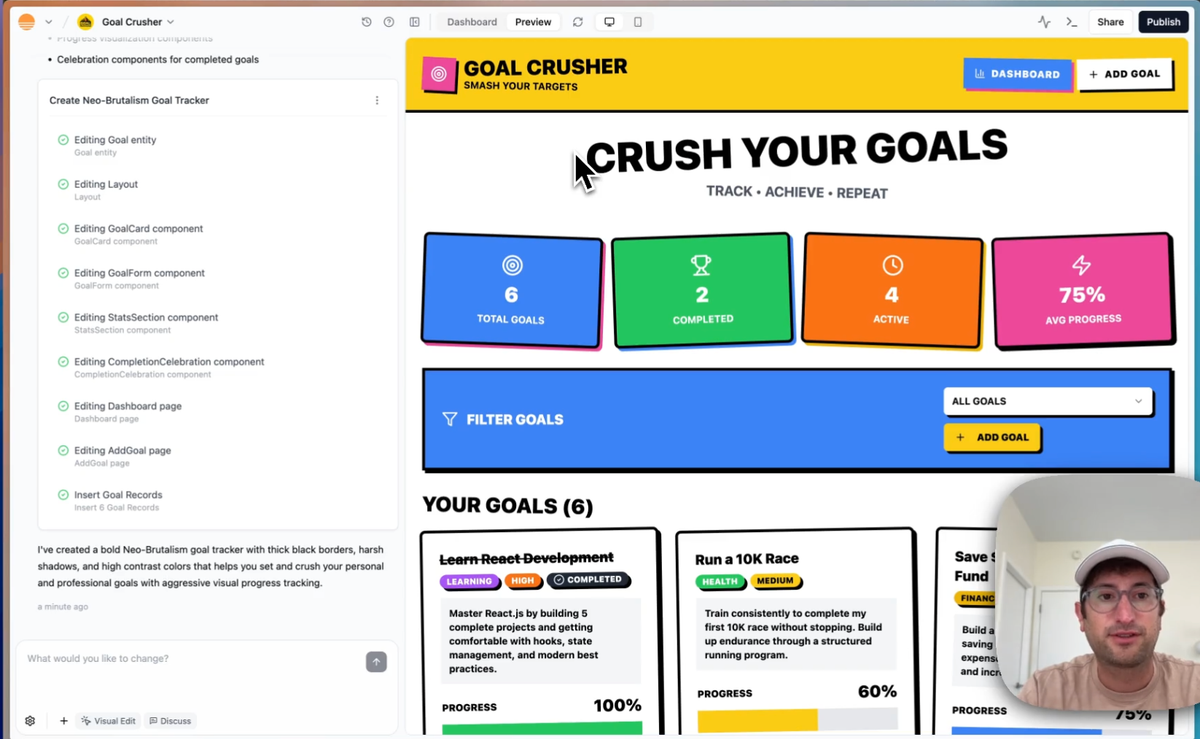
Once you've crafted your prompt, Base44 will start building the initial version of your app.
This process typically takes about 5 minutes, during which you can see real-time updates on the app's features and design.
This is when you'll see the first version of your app on the dashboard.
Exploring the Base44 Dashboard and Features
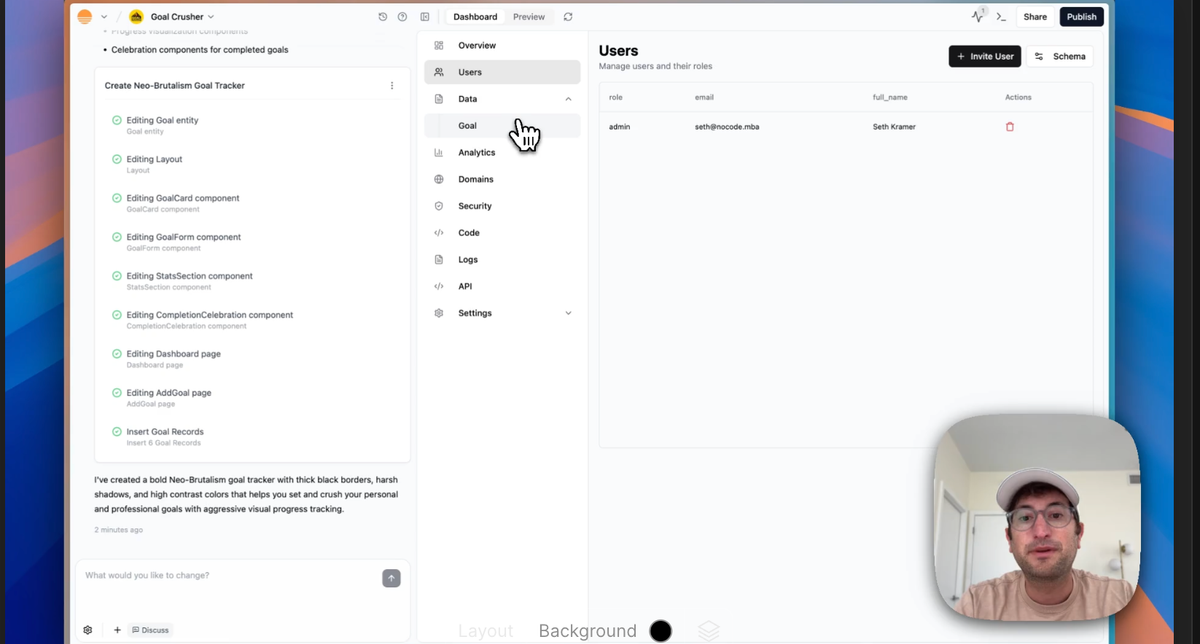
After your app is generated, you'll have access to a range of powerful tools and features:
- Version history
- Device preview (mobile and desktop)
- User management
- Database integration
- Analytics
- Domain management
- Security checks
The dashboard also includes code and API tabs for more advanced users who want to customize their apps further.
Again, what's nice is that all of this is integrated into Base44, which means that you don't have to integrate other tools like you do with Lovable or Bolt.
Building a Goal Tracking App with Base44
Now that we understand the basics, let's dive into creating our goal tracking app:
Step 1: Add User Authentication
To allow users to have their own personalized goals, we need to implement user authentication. Base44 makes this process simple with built-in authentication options.
Step 2: Create a Landing Page for Logged-Out Users
Design a welcoming landing page that encourages new users to sign up or existing users to log in.
This is important as you will need this page for new users.
Step 3: Implement Goal Creation and Management
Add functionality for users to create, edit, and track their goals. Include features like progress tracking and goal categories.
Customizing Your Base44 AI App
Base44 offers several ways to refine and enhance your app:
Visual Editing
Use the visual editor to make quick changes to your app's layout and design without coding.
Simply click an area and then make the edits.
AI-Assisted Development
Leverage the "discuss" feature to ask the AI for suggestions on new features or improvements.
This allows you to ask Base44 questions about how to do things without changing the code or design.
Adding AI-Powered Features
Integrate AI functionality, such as automatic milestone generation, using Base44's built-in OpenAI integration.
Again, no need to sign up for third-party integrations.
Finalizing and Publishing Your Base44 AI App
When you're ready to share your app with the world, follow these steps:
Step 1: Run Security Checks
Use Base44's built-in security check feature to identify and address any potential vulnerabilities. This is highly recommended.
Step 2: Publish Your App
Click the "Publish" button to make your app live on a temporary domain provided by Base44.
This is hosted by Base44. You can also add your own custom domain on their paid plans.
Learn more here.
The Future of Base44
With Wix's acquisition of Base44, we can expect even more powerful features and integrations in the future. This partnership brings together Wix's extensive website building capabilities with Base44's AI-powered app development tools, opening up new possibilities for creators and entrepreneurs.
Advantages of Using Base44 for Apps Such As The One We Built
Building an app with Base44 offers several benefits:
- Rapid development with AI assistance
- Built-in user authentication and database management
- Easy integration of AI features like milestone generation
- Visual editing for quick design changes
- Seamless publishing and domain management
Enhancing Your App with Base44 Security Features
Security is crucial for any app, especially one handling user data. Base44 provides built-in security features to help protect your users and their information:
- Automated security checks
- User data encryption
- Secure authentication options
- Regular security updates
Exploring Base44 AI App Integrations
Base44 offers a variety of integrations to enhance your app's functionality:
- OpenAI for AI-powered features
- Slack for team communications
- Twilio for SMS capabilities
- Resend for email functionality
These integrations allow you to create more sophisticated apps without the need for complex coding or third-party services.
Tips for Successful AI App Publishing with Base44
To ensure your app's success after publishing, consider these tips:
- Thoroughly test your app on different devices and browsers
- Create a compelling app description for the Base44 marketplace
- Regularly update your app based on user feedback
- Utilize Base44's analytics to track user engagement and improve your app
By following these guidelines, you can create a successful AI-powered goal tracking app using Base44's powerful tools and features.
Want to learn more about Base44? Watch this to learn how to integrate payments into your platform.
Ready to start building your own AI-powered apps?
Sign up for No Code MBA today and learn how to leverage tools like Base44 to bring your ideas to life. Our courses will teach you the skills you need to create professional, functional apps without writing a single line of code.
Join No Code MBA now and start your journey to becoming a no-code app developer.
Related Base44 Articles
Explore more of our Base44 coverage:
- Base44 Review 2026: Is It Worth It? – Our complete breakdown
- Base44 vs Lovable – Which AI app builder is better?
- V0 vs Base44 – Frontend focus vs full-stack
- Bubble vs Base44 – Traditional vs AI no-code
- Base44 Alternatives – Complete guide to AI app builders
Frequently Asked Questions
What is Base44?
Base44 is an AI-powered app builder that allows users to create functional applications without coding. It was recently acquired by Wix for $80 million.
Do I need coding experience to use Base44?
No, Base44 is designed for users with no coding experience. However, it also offers advanced features for those who want to customize their apps further.
Can I integrate AI features into my Base44 app?
Yes, Base44 offers built-in integrations with AI services like OpenAI, allowing you to add AI-powered features to your app easily.
How long does it take to build an app with Base44?
The initial app generation takes about 5 minutes. However, the time to fully develop and customize your app will depend on its complexity and your desired features.
Is Base44 suitable for building business applications?
Yes, Base44 can be used to create a wide range of applications, including business tools, productivity apps, and more.
How does Base44 handle app security?
Base44 offers built-in security features, including automated security checks, user data encryption, and secure authentication options.
Can I publish my Base44 app on a custom domain?
Yes, Base44 allows you to publish your app on a custom domain for a more professional appearance.
Advertiser disclosure: some links on this website are affiliate links, meaning No Code MBA may make a commission if you click through and purchase.