Lovable is getting a lot of attention from app developers.
And for good reason.
This innovative AI-powered app builder is revolutionizing the world of no-code development, allowing anyone to bring their ideas to life without writing a single line of code - just through prompts.
By the end of this post, you'll know how to get started and have the knowledge you need to start building.
Getting Started with Lovable for No-Code App Development
Lovable simplifies the app creation process by allowing you to describe your app idea in plain English. The AI then interprets your requirements and generates a functional prototype. Here's how to get started:
Step 1: Create a New Project
- Log in to your Lovable account (you'll need a paid plan for full functionality)
- Click on "Create New Project"
- Provide a detailed description of your app idea
- Include design preferences for a more personalized result
For our recipe tracking app, we'll use the following prompt:
"Create a recipe tracking app where users can log in and save their own recipes. Recipes should be categorized and include an image along with other recipe details. The design should be modern and sleek with pops of color."
Step 2: Review the Initial Layout
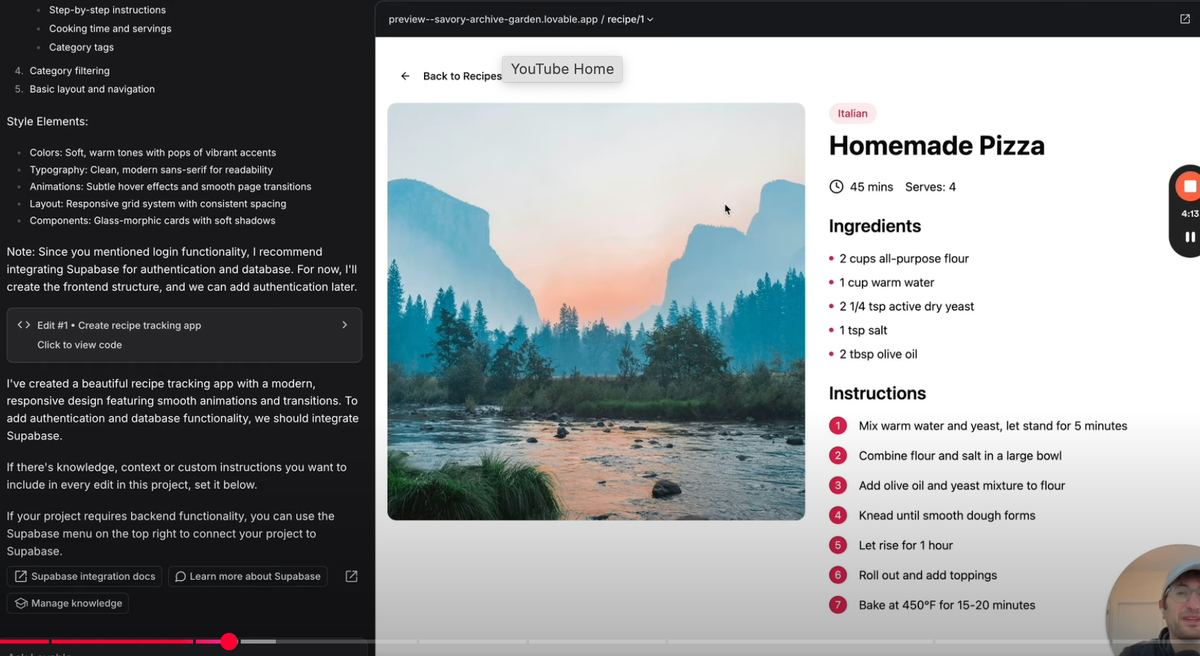
Once you submit your description, Lovable will generate an initial layout for your app. This typically includes:
- A project plan
- Design inspiration
- Features for the first version
- Style elements
Take some time to review these elements and make sure they align with your vision.
Integrating Supabase for Database Connection and User Authentication
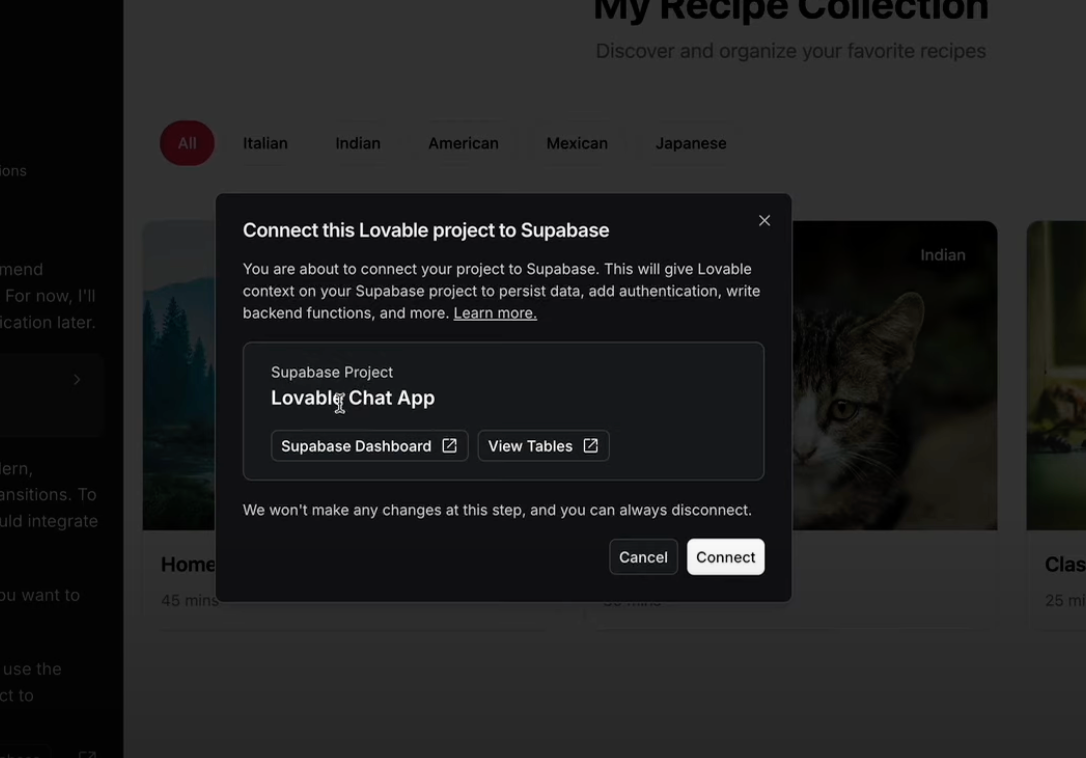
To add functionality to our app, we'll need to integrate a backend database. Lovable recommends using Supabase for this purpose.
Step 1: Connect Supabase
- Click on the Supabse option in the top right corner of Lovable
- Create a Supeabase account if you don't have one
- Link your Supeabase account to Lovable
- Create a new project in Supabase (you can use the free plan for now)
Step 2: Set Up Authentication
With Supabase connected, we can now add user authentication to our app:
- Ask Lovable to set up authentication and sign-in/login functionality
- Review and apply the SQL commands generated by Lovable
- In Supabase settings, disable email confirmation for testing purposes
Building Core Features of the Recipe Tracking App
Now that we have our basic structure and authentication in place, let's add the core features of our recipe tracking app.
Step 1: Implement Recipe Creation and Storage
AskLovable to add the ability to create and save recipes to the database. Specify that you want recipes to be either public or private to the logged-in user.
Step 2: Design the Recipe Form
Lovable will create a form for adding new recipes. This typically includes fields for:
- Recipe title
- Description
- Ingredients (with the ability to add or remove)
- Instructions
- Cooking time
- Category
- Public/Private toggle
- Image URL
Step 3: Implement Recipe Display
Ask Lovable to create a display for existing recipes, including a list view and a detailed view for individual recipes.
Debugging and Fixing AI-Generated Code
While Lovable is powerful, you may encounter some issues that need debugging. Here's how to approach this:
Step 1: Identify the Issue
If you encounter an error or unexpected behavior, take note of exactly what's happening.
Step 2: Use Lovable Chat for Resolution
- Describe the issue to Lovable in detail
- Include any error messages or logs
- Ask for step-by-step solutions
Step 3: Apply and Test Fixes
Apply the suggested fixes and test the functionality to ensure the issue is resolved.
Enhancing User Experience and Access Control
To improve our app's usability, let's add some additional features:
Step 1: Implement Public Recipe Viewing
Ask Lovable to allow logged-out users to view public recipes on the index page.
Step 2: Add Login Prompts
Request that Lovable add login prompts when logged-out users try to access restricted features like adding recipes.
Step 3: Ensure Proper Visibility Settings
Verify that private recipes are only visible to their creators, while public recipes are visible to all users.
Publishing Your Web Application with Lovable
Once you're satisfied with your app, it's time to make it available to the world!
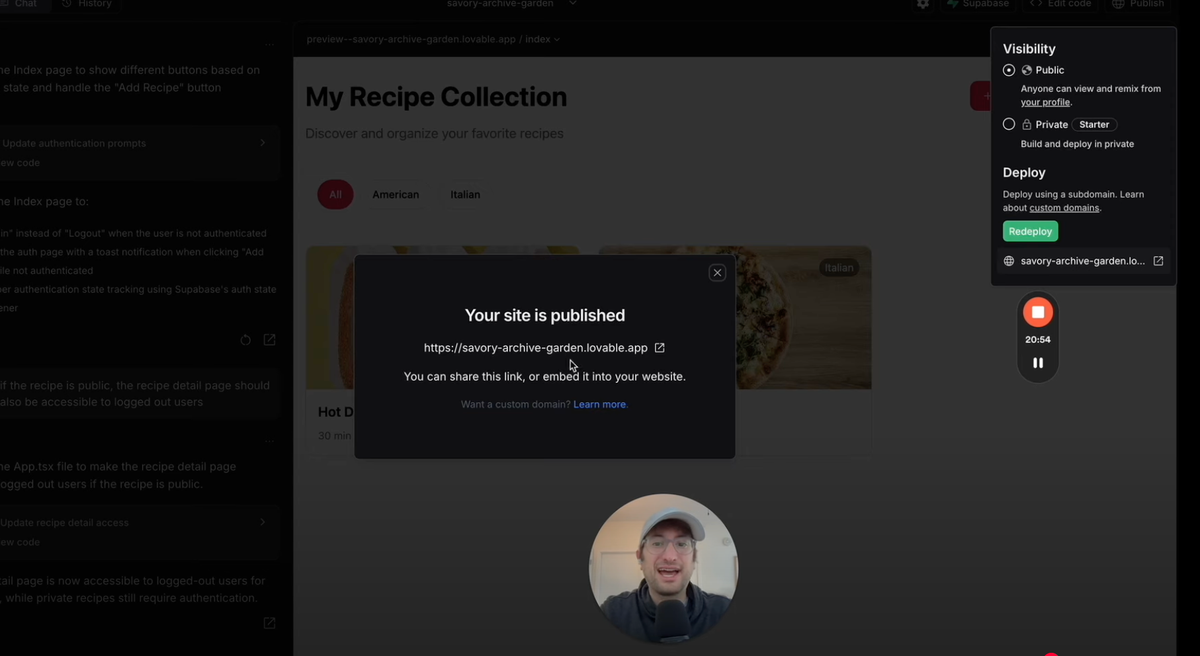
Step 1: Use One-Click Publish
- Click on the "Publish" button at the top of Lovable
- Choose "Deploy" to start the publishing process
Step 2: Access Your Published App
Lovable will provide a subdomain where your app is now live and accessible to anyone on the internet.
Step 3: Consider Custom Domain Options
If you want a more professional look, Lovable supports publishing to custom domains.
Advanced Tips for Lovable AI App Development
Editing Code Through GitHub Integration
For more advanced customization:
- Transfer your Lovable repository to GitHub
- Make changes in GitHub and push them back to Lovable
Utilizing Version History
Lovable keeps a history of all changes:
- Access previous versions from the top left menu
- Restore earlier versions if needed
Potential AI-Generated Enhancements
Consider asking Lovable to implement features like:
- AI-generated recipe suggestions
- Nutritional information calculation
- Meal planning functionality
Here is a video on how to set up payments inside of Lovable:
Building apps with AI on Lovable opens up a world of possibilities for aspiring developers and entrepreneurs. With its intuitive interface and powerful AI capabilities, you can bring your app ideas to life without extensive coding knowledge. Whether you're creating a simple tool or a complex application, Lovable provides the support and functionality you need to succeed.
Read our initial thoughts on Lovable here.
Ready to take your app development skills to the next level? Sign up for No Code MBA at https://nocode.mba/sign-up and discover even more ways to create amazing applications without writing code!
Frequently Asked Questions
Do I need coding experience to use Lovabe?
No, Lovable is designed for users with no coding experience. It uses natural language processing to interpret your app requirements and generate the necessary code.
Can I customize the design of my app in Lovable?
Yes, you can provide design preferences in your initial description, and Lovable will incorporate them. You can also make further adjustments using the visual editor or by editing the code directly if you're comfortable doing so.
Is Lovable suitable for building complex applications?
While Lovable is great for building prototypes and simpler applications, it can also handle more complex projects. However, for very intricate or specialized applications, you might need to supplement with some custom coding. If you're interested in building more advanced AI projects, consider our course on building a fully functioning AI project with no-code.
How does Lovable handle app updates and maintenance?
Lovable allows you to make changes and updates to your app at any time. You can use the AI chat to request changes, or make them manually through the editor or GitHub integration. For a deeper understanding of AI APIs, you might want to explore our complete guide to OpenAI API endpoints.
Can I use Lovable for commercial projects?
Yes, you can use Lovable to build commercial applications. However, make sure to review their terms of service and pricing plans to ensure they meet your specific needs and usage requirements. If you're interested in building more advanced AI applications, you might want to check out our course on building a ChatGPT-like app using OpenAI's Assistant API.
Advertiser disclosure: some links on this website are affiliate links, meaning No Code MBA may make a commission if you click through and purchase.