
Building with AI has never been more accessible, but setting up the right tools can feel overwhelming.
If you've been watching developers create amazing projects with Claude Code and wondering how to get started yourself, you're in the right place. This Claude Code setup guide will walk you through everything you need to know about installation, features, and whether it's the right choice for your coding projects.
What is Claude Code and Why You Need a Paid Plan
Claude Code is Anthropic's AI coding platform that transforms how developers write, debug, and build applications. Unlike traditional coding environments, it provides an intelligent assistant that can generate entire applications, modify existing code, and even interact with your computer's file system.
Here's the catch: you absolutely need a paid Claude subscription to access Claude Code. Even their lowest tier plan will work, but there's no free version available. This might seem like a barrier, but it's actually a smart move if you're serious about AI-assisted development.
The subscription model offers significant advantages over API billing:
- Much lower token costs compared to pay-per-use pricing
- Predictable monthly expenses for your development work
- Higher token limits that won't leave you stranded mid-project
Once you have your paid subscription, you can access Claude Code through two main interfaces: the Claude Desktop app or directly through your terminal. Both approaches have their merits, and I'll show you exactly how to set up each one.
Claude Code Installation Tutorial: Desktop App vs Terminal Setup
Desktop App Method
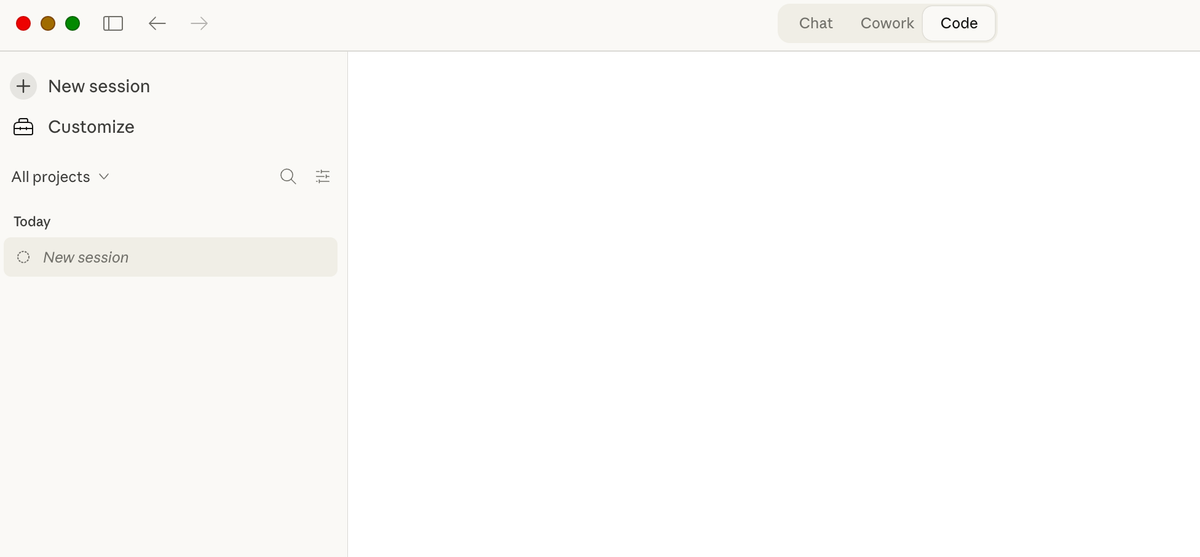
The desktop app is perfect if you prefer visual interfaces over command lines. Simply download the Claude Desktop application and look for the "Code" tab once you're logged in. This method provides:
- A user-friendly interface with clickable buttons and menus
- Easy model selection through dropdown menus
- Visual folder management without typing commands
- Integration with your existing Claude workspace
The desktop app makes switching between different AI models simple. You can choose from Opus, Sonnet, or Haiku depending on your project needs and budget constraints.
Terminal Installation Process
For developers comfortable with command-line interfaces, the terminal offers more control and flexibility. Here's how to get started:
Step 1: Open your terminal application (available on all computers - use search to find "Terminal" on Mac or "Command Prompt" on Windows)
Step 2: Navigate to your project folder. This is absolutely critical - the folder you're in determines what Claude can access on your computer.
Step 3:Copy the installation command from the Claude Code website and paste it into your terminal
Step 4: Type "claude" to launch the application
Step 5: Log in using your paid Claude account credentials
The terminal approach gives you direct access to all slash commands and provides a more integrated development experience once you're comfortable with it.
Security Best Practices
Both installation methods require careful attention to folder permissions. Claude Code can only access files within the specific folder you're working in. This is a safety feature, not a limitation.
Always create dedicated project folders before starting Claude Code. Never run it from your main user directory or desktop. This prevents the AI from accidentally accessing sensitive personal files or system folders.
Essential Claude Code Features and Slash Commands Guide
Once you're set up, slash commands become your primary way to interact with Claude Code's advanced features. These commands work identically in both the desktop app and terminal versions.
Core Slash Commands
Model switching gives you flexibility based on your project requirements:
- /model opus - For complex, high-quality code generation
- /model sonnet - Balanced performance and cost
- /model haiku - Fast, lightweight responses
The feature planner command breaks down large projects into manageable components. Type /feature-planner before starting complex builds to get a structured roadmap of what needs to be built.
Session management commands keep your workspace organized:
- /clear - Start a fresh conversation
- /compact - Compress long conversations to save tokens
Skills and Plugins System
Skills are contextual add-ons that enhance Claude's capabilities for specific tasks. Use /find-skills to browse available options. Popular choices include:
- Frontend design skills for web development
- Web design guidelines for better UI/UX
- Security review tools for code auditing
These skills automatically activate when relevant to your current task, providing specialized knowledge without manual activation.
Practical Coding Examples
Let me show you how powerful Claude Code can be with a simple example. I asked it to "build a simple landing page for a coffee shop website." Within seconds, it created a complete HTML file with CSS styling, asked for permission to save the file, and even offered to open it in my browser.
The permission system ensures you maintain control. Claude will ask before creating files, running commands, or making significant changes to your project structure.
Claude Code vs Cursor IDE vs OpenAI Codex: Complete AI Coding Tools Comparison
Choosing the right AI coding tool depends on your specific needs, budget, and technical comfort level. Let me break down how these three major players compare.
Claude Code Advantages
Claude Code excels in several key areas:
- Cost-effective token usage through subscription pricing
- Direct access to Anthropic's latest and most capable models
- Robust safety features and permission controls
- Seamless integration with Claude's broader ecosystem
The subscription model means you can build extensively without worrying about individual token costs. This makes it ideal for developers working on larger projects or learning through experimentation.
Cursor IDE Benefits
Cursor offers a different approach that many developers love:
- Multi-model support lets you choose between Claude, OpenAI, and other providers
- Superior user interface with modern design principles
- Built-in browser testing and agent capabilities
- Ability to run Claude Code within Cursor's terminal
This last point is particularly interesting - you can get the best of both worlds by using Claude Code inside Cursor's environment.
OpenAI Codex Evaluation
OpenAI's offering brings its own strengths:
- Affordable $20 monthly plan with generous token allocations
- Familiar ChatGPT-style interface
- Easy setup process compared to terminal-based alternatives
- Strong integration with existing OpenAI services
If you already have a ChatGPT subscription, Codex might be the most economical starting point for AI-assisted coding.
Cost Analysis and Value Comparison
Based on my experience using all three platforms:
Most cost-effective for heavy usage: Claude Code's subscription model provides excellent value for developers building multiple projects or spending significant time coding with AI assistance.
Best balance of features and price: OpenAI Codex at $20/month offers solid performance without breaking the bank.
Premium experience: Cursor provides the most polished interface but may cost more in the long run due to per-token pricing.
Getting Started with Claude Code: Best Practices and Next Steps
Now that you understand the setup process and feature set, let's talk about making the most of your Claude Code experience.
Initial Setup Checklist
Before diving into your first project:
- Verify your paid subscription is active and linked correctly
- Create a dedicated folder structure for your coding projects
- Install essential skills like frontend design and security review
- Test the permission system with a simple file creation task
Start small. Build a simple webpage or basic utility script before attempting complex applications. This helps you understand how Claude interprets your requests and manages files.
Development Workflow Tips
Effective Claude Code usage follows certain patterns:
Local development first: Build and test locally before pushing to cloud repositories. This keeps your development costs down and provides faster iteration cycles.
Version control integration: Use Git to track changes and collaborate with others. Claude Code works well with existing version control workflows.
Remote access planning: While Claude Code primarily works locally, you can set up remote connections to continue coding from different devices.
Troubleshooting Common Issues
Most problems stem from folder permissions or session management:
Permission errors: Always ensure Claude Code is running from the correct project directory. Check folder permissions if you're getting access denied messages.
Model switching problems: Use the /model command explicitly rather than assuming the system will choose the best option automatically.
Token management: Use /compact to optimize long conversations and /clear when starting unrelated projects.
Ready to take your coding skills to the next level? At No Code MBA, we teach you how to build powerful applications without traditional programming - and now with AI tools like Claude Code, the possibilities are endless. Sign up for No Code MBA to learn how to combine no-code tools with AI assistance for maximum productivity.
Related AI Coding Guides
- Cursor Review 2026 — Full review of the AI-powered IDE
- Best AI App Builders for Vibe Coding — Top tools compared
- Claude Cowork Tutorial — Learn Claude's collaborative coding features
- 12 No-Code Tools for Beginners — Great starting points
Keep reading
What are AI loops? The complete guide to AI agent loops in 2026
Frequently Asked Questions
Do I need coding experience to use Claude Code?
No, Claude Code is designed to be accessible to beginners. However, basic understanding of file systems, folders, and terminal navigation will make your experience smoother. The desktop app version is particularly beginner-friendly.
Can I use Claude Code for free?
No, Claude Code requires a paid Claude subscription, even at the lowest tier. This ensures you get better token economics compared to pay-per-use API billing.
What's the difference between using Claude Code in the desktop app versus terminal?
Both offer the same core functionality, but the desktop app provides a visual interface with clickable menus, while the terminal offers more direct control and faster access to advanced features through slash commands.
How does Claude Code compare to GitHub Copilot?
Claude Code can generate complete applications and interact with your file system, while GitHub Copilot focuses on code completion and suggestions within existing development environments. Claude Code is more comprehensive but requires a different workflow.
Is my code safe when using Claude Code?
Yes, Claude Code only accesses files within the specific folder you designate. It asks for permission before making changes and includes robust safety features to prevent accidental modifications to important system files.
Can I use Claude Code with existing projects?
Absolutely. Navigate to your existing project folder before launching Claude Code, and it will have access to all files within that directory. It can analyze, modify, and extend existing codebases effectively.
Advertiser disclosure: some links on this website are affiliate links, meaning No Code MBA may make a commission if you click through and purchase.