(The video is a sponsored video from Dumpling AI - thank you, Dumpling AI!)
In this post, you're going to learn how to create an AI agent for automated content creation.
We'll walk you through how to do this with Dumpling AI that use AI agents to research news on a specific topic, write engaging X (formerly Twitter) posts, and then use Make to automate the entire process.
Setting this up gives you the ability to create content on autopilot. Simply, follow the steps to get started.
Step 1: Setting Up Your AI Research Agent with Dumpling AI
To get started with your AI-powered social media automation system, we'll first create an AI agent that handles the research part of our workflow. Here's how to do it:
- Go to Dumpling AI and click on "AI agents" then "New AI agent"
- Choose "Create from scratch"
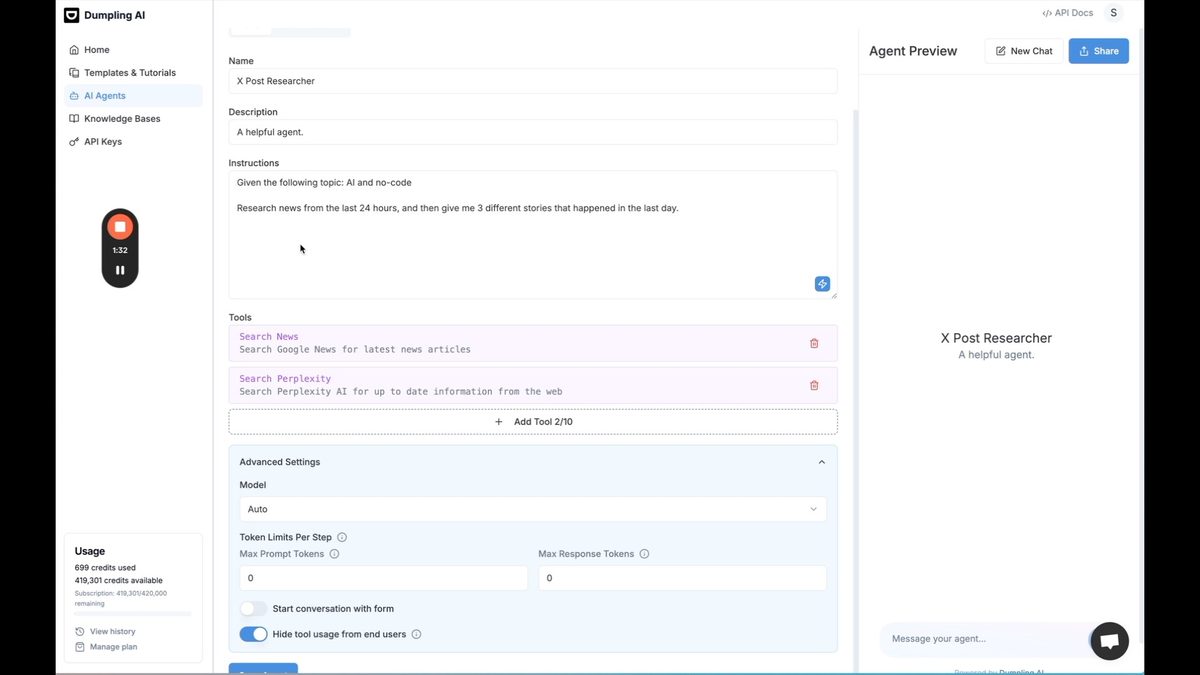
- Name your agent (e.g., "X post researcher")
- Add a description: "A helpful agent who is an expert at researching news and converting to posts"
- Under "Tools," add Google News and Perplexity AI capabilities
- In the instructions, specify what you want the agent to research (e.g., "Research the latest updates from AI companies like OpenAI, Anthropic, and others from the last 24 hours")
- Save your agent and test it by clicking "Start research"
This AI news research tool will gather the most recent and relevant information about AI companies and their developments, setting the foundation for your automated content workflow.
Step 2: Creating an X Post Writer Agent
Now that we have our research agent, let's create another AI agent specifically for writing X posts:
- Create a new AI agent from scratch
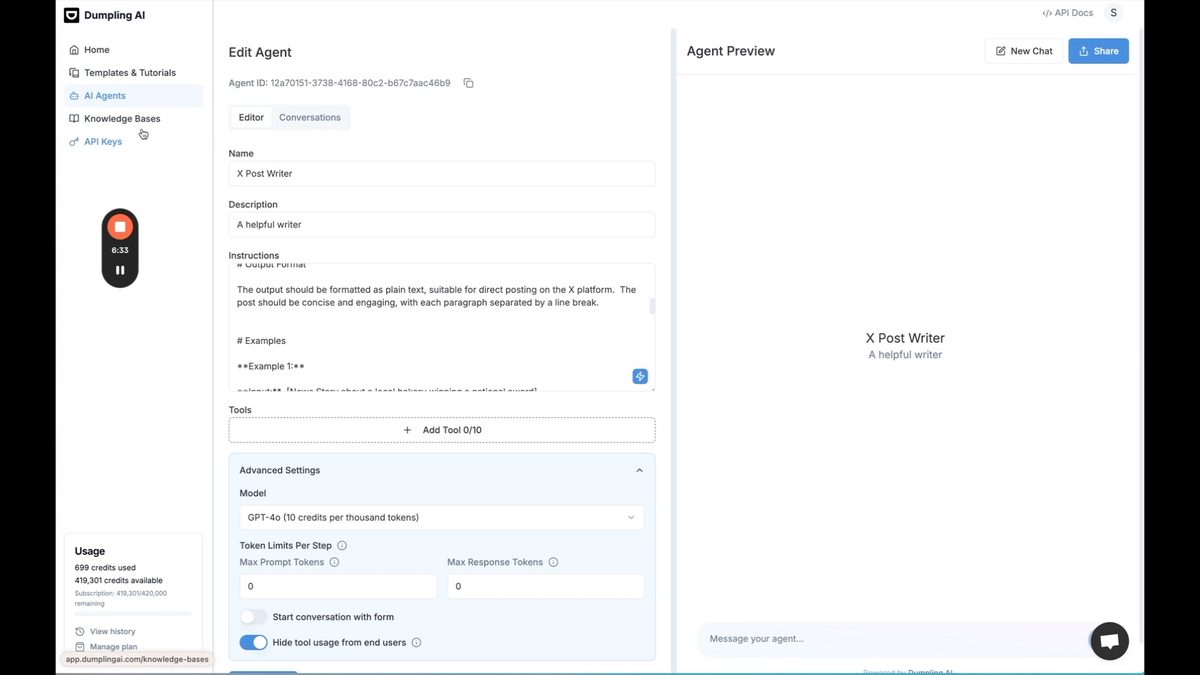
- Name it "X post writer"
- Use the generate tool to create a detailed prompt for writing engaging posts
- Specify instructions like "Do not use hashtags or emojis" and "Start with a hook to engage the reader"
- In advanced settings, select GPT-4 as the model for higher quality writing
- Save your agent
This X (Twitter) post generator will take the research from your first agent and transform it into compelling social media content.
Step 3: Connecting Your AI Agents for a Seamless Workflow
To create an AI-driven social media management workflow, we need to connect our two agents:
- Go back to your research agent
- Add a new tool: "Messaging an AI agent"
- Select the X post writer as the agent to message
- Update the instructions to include "For each story, message the X post writer to write an X post and share the X post response"
- Save the updated agent
This connection allows your research agent to pass information directly to your post writer, creating a smooth, automated process.
Step 4: Refining Your AI-Generated Content
To improve the quality of your AI-generated posts, consider these tips:
- Create a list of words to avoid in your X post writer instructions
- Specify the tone and style you want for your posts
- Regularly review and update your agents' instructions based on the results
- Consider adding a human review step before posting to ensure quality and relevance
Step 5: Structuring Output for Easy Integration
To make your automated AI content workflow more efficient, structure the output in a format that's easy to use in other tools:
- Update your research agent's instructions to output responses in JSON format
- Include fields like "headline," "url," and "x_post" in the JSON structure
- This structured output will make it easier to integrate with other tools and platforms
Step 6: Automating Your Workflow with Make (Integromat)
To fully automate your content creation and posting process, we'll use Make (formerly Integromat):
- Create a new scenario in Make
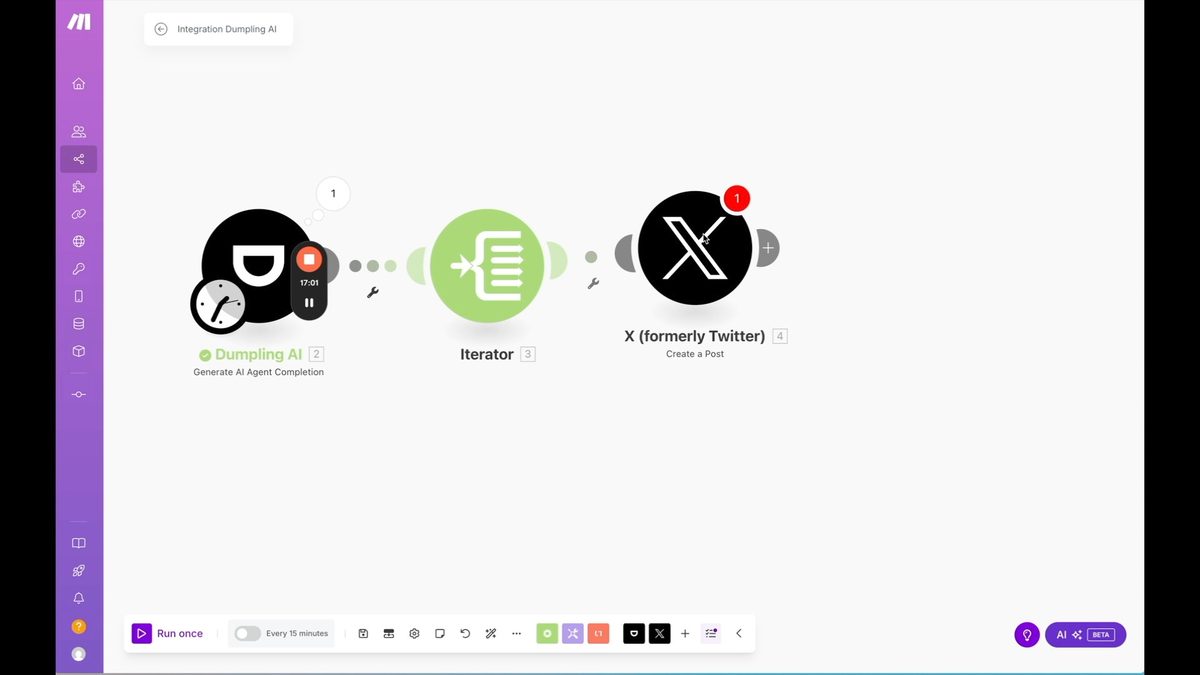
- Add Dumpling AI as your first module
- Select "Generate AI Agent Completion"
- Copy your Dumpling AI agent ID and paste it into Make
- Add a message to trigger your agent (e.g., "start")
- Enable JSON parsing for the response
- Add an iterator to process each post
- Connect to X (Twitter) API to post your content
- Schedule your workflow to run daily
With this setup, you've created a powerful no-code AI automation system that researches, writes, and posts content about AI news every day.
Expanding Your AI-Powered Social Media Automation
Once you've mastered this workflow, consider these ways to enhance your automated content creation:
- Adapt the system for other social media platforms like LinkedIn or Facebook
- Create topic-specific agents for different areas of interest
- Implement sentiment analysis to ensure your posts align with your brand voice
- Use AI-generated content as a starting point for more in-depth articles or newsletters
By leveraging the power of AI agents for automated content creation, you can stay on top of AI news and maintain an active social media presence without spending hours each day on research and writing. This AI-powered social media automation system allows you to focus on strategy and engagement while the AI handles the heavy lifting of content creation.
Ready to take your no-code skills to the next level? Sign up for No Code MBA and learn how to build powerful applications and automate your workflows without writing a single line of code. Join us today and unlock your potential in the world of no-code development!
Frequently Asked Questions
What is Dumpling AI?
Dumpling AI is a platform that allows users to create AI agents to automate various tasks, including content creation, research, and social media management.
Do I need coding skills to use this AI-powered content creation system?
No, this system is designed to be used without coding skills. It utilizes no-code tools like Dumpling AI and Make (Integromat) to create and automate the workflow.
Can I customize the AI agents to focus on specific topics or industries?
Yes, you can customize the instructions and prompts for your AI agents to focus on any topic or industry that interests you or aligns with your brand.
How accurate is the AI-generated content?
While AI-generated content can be quite accurate, it's always a good idea to implement a human review step to ensure quality, relevance, and accuracy before posting.
Can this system be used for other social media platforms besides X (Twitter)?
Yes, you can adapt this system to work with other social media platforms by modifying the Make (Integromat) workflow to connect with different APIs.
How often should I update or refine my AI agents?
It's a good practice to regularly review and update your AI agents' instructions based on the quality of output and any changes in your content strategy or industry trends.
Advertiser disclosure: some links on this website are affiliate links, meaning No Code MBA may make a commission if you click through and purchase.